Display Options
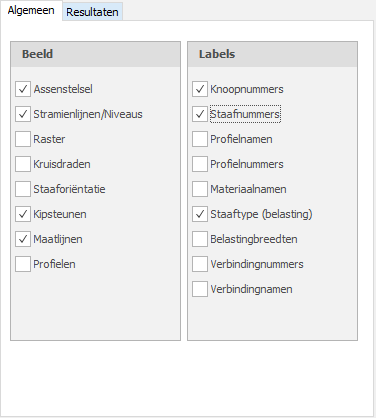
Axis system
Drawing of the global coordinate system.
Grid lines / Levels
Grid lines, levels and/or auxiliary lines are drawn dotted. See Grid Lines and Levels.
Grid
A grid is drawn by default. Its dimensions and the colour of the grid lines can be set. See Grid.
Crosshairs
The 2 crosshairs (horizontal and vertical) are drawn. This can be handy during input.
Member orientation
The local member coordinate system (see Sign Convention) is drawn in the middle of the member. The direction of the local z-axis is shown. This is particularly important for entering the member loads, which are entered in the local member coordinate system. See Member Loads.
Node numbers
Node numbers are shown in brackets (..) next to the node.
Member numbers
The member numbers are shown in square brackets [..] next to the member.
Profile names
The profile names are shown next to the member.
Profile numbers
Material names
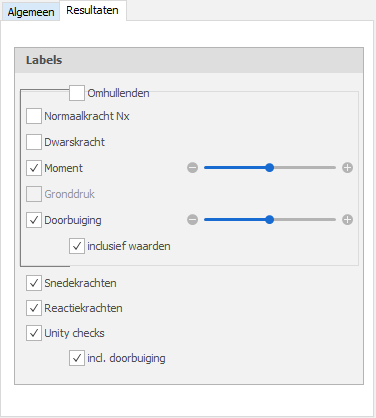
Axial force
Drawing of the N-line. The scale can be set.
Shear force
Drawing of the D-line. The scale can be set.
Moment
Drawing of the M-line. The scale can be set.
Soil pressure
For elastically supported beams and slabs a drawing of the soil pressure can be shown. The scale can be set.
Deflection
Drawing of the deflection line. The scale can be set.
Reaction forces
Drawing of the reaction forces in all supports.
Unity checks
The unity check can be shown per member. This is the result of the check according to the Eurocode (steel or timber). When the unity check is smaller than 1.00 the member complies and a green dot  is drawn. When the unity check is greater than 1.00 the member does not comply and a red triangle
  is drawn.
Double-clicking on the dot or triangle shows a detailed calculation of the member concerned.