Load Case Sequence
The right mouse button opens the context menu shown below. With these functions you can easily adjust the sequence of the load cases and/or insert load cases.
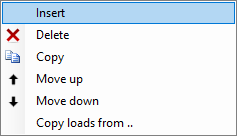
Functions
Insert
A new load case is created and inserted above the current one.
Delete
The load case is deleted, including all its loads.
Copy
The load case is copied, including all its loads.
Move up / Move down
A load can be moved one line up or down.