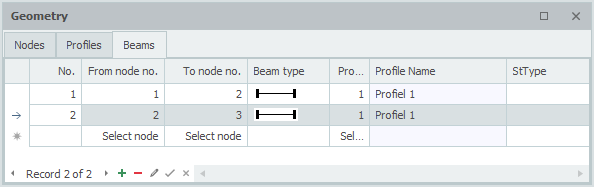
Members
With the Beam Wizard you create your input quickly. See Wizard. Naturally you can change the members and nodes you have added afterwards.
Changing a member
You change a member by clicking on the member with the left mouse button and then choosing properties with the right mouse button. Or, even easier, by double-clicking on the member. The dialog box below is opened.
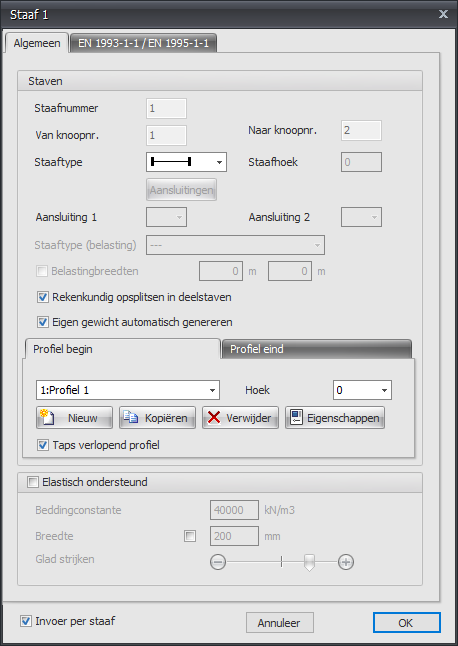
Member data
Member number
The member number is generated automatically.
From node no.
The number of the start node.
To node no.
The number of the end node.
Member angle
The angle in degrees with the global x-axis. Counter-clockwise is positive.
Member type
The member type specifies whether the member is hinged or moment-fixed at the node concerned.
| indication | description |
|---|---|
 |
both sides 'rigidly' fixed (default) |
 |
start 'rigidly' fixed; end hinged |
 |
start hinged; end 'rigidly' fixed |
 |
both sides hinged |
 |
both sides 'rigidly' fixed, TENSION ONLY |
 |
start 'rigidly' fixed; end hinged, TENSION ONLY |
 |
start hinged; end 'rigidly' fixed, TENSION ONLY |
 |
both sides hinged, TENSION ONLY |
 |
both sides 'rigidly' fixed, COMPRESSION ONLY |
 |
start 'rigidly' fixed; end hinged, COMPRESSION ONLY |
 |
start hinged; end 'rigidly' fixed, COMPRESSION ONLY |
 |
both sides hinged, COMPRESSION ONLY |
 |
both sides 'elastically' fixed |
 |
start 'elastically' fixed; end hinged |
 |
start hinged; end 'elastically' fixed |
 |
both sides hinged |

Specifically and only for the spring member connections the spring data has to be entered. See Spring Connections.
Split into sub-members for analysis
Setting whether, for the determination of the force distribution (frame analysis), the member has to be split into sub-members when nodes are found on the member. This setting is switched on by default.
Profile
Profile name begin/end
Here you choose the profile.
Angle
The angle of the profile. That is the angle relative to the local coordinate system. Normally this is 0 degrees. If you want to enter a column rotated, for example (so loaded about its weak axis), you enter 90 degrees here.



You can create new profiles, and copy and delete profiles. Choose Properties when you want to change the profile data and/or select another standard profile from the profile database.
See Profiles.
Tapered profile
You can optionally enter a tapered profile. The tab "Profile name end" is then activated. Here you enter the 2nd profile at the end of the member. Please note: the basic shape of the profile (H-, U-, L-shape, etc.) must match that of the profile at the start of the member.
Elastically supported
This gives you the possibility to support a member elastically. The bedding is schematised as a series of springs that can only take up positive reactions, so "lifting off" is provided for as well. The spring distance can be influenced with Smoothing. The modulus of subgrade reaction is converted automatically into springs with the correct spring value.
Modulus of subgrade reaction
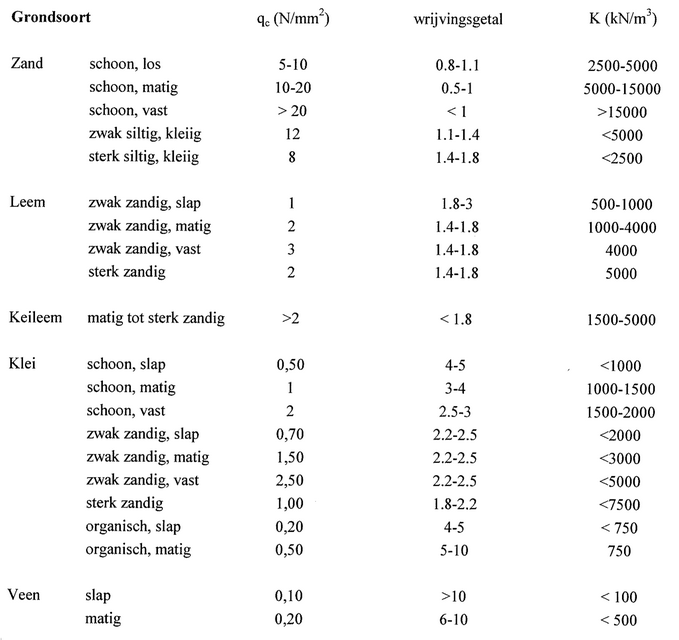
The modulus of subgrade reaction K in kN/m3. The default value is 10,000 kN/m3.
Global values of the modulus of subgrade reaction K for various types of subsoil:
Width
The width of the support. By default the width of the profile is taken, but a different width can be entered. The width is important for determining the spring value of the springs.
Smoothing
By default the centre-to-centre distance of the springs equals 1x the profile height. It is possible to vary this from 0.5x to 5x the profile height. The centre-to-centre distance is important for determining the spring value of the springs.
Input per member
This gives you the possibility to change the input for every new member.
Members table
Members can also be added and/or changed in the table Members at the bottom left. It does not matter. You can also switch between graphical and table input in the meantime.